
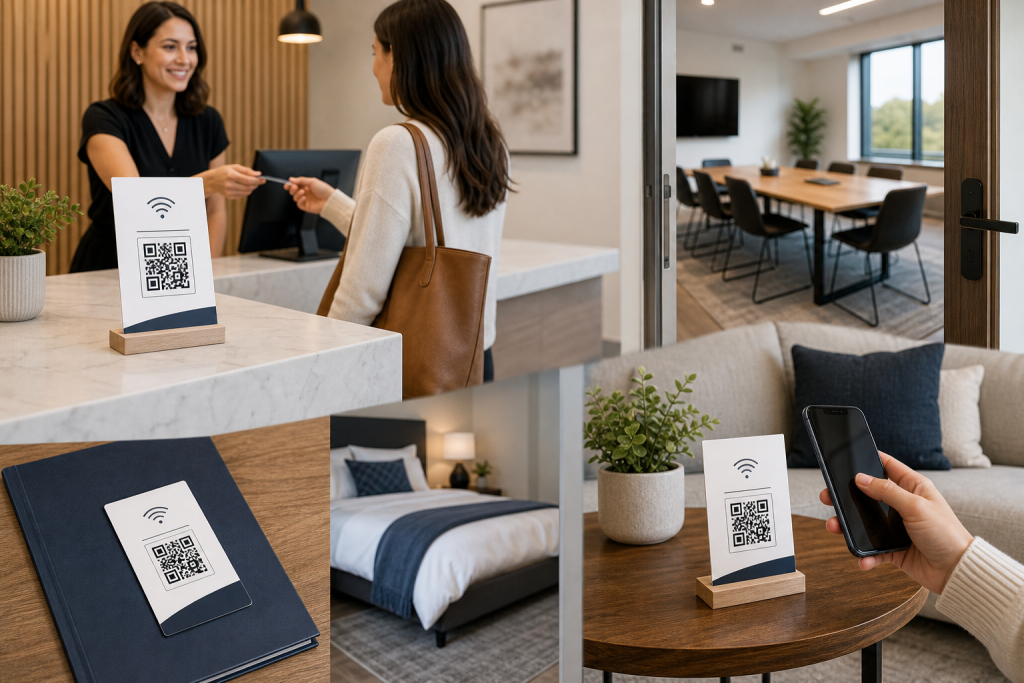
When guests need internet access, the biggest challenge usually is not the Wi-Fi itself. It is the handoff. People arrive, ask for the network name, mistype the password, or interrupt staff to get connected again. A QR Wi-Fi card helps solve that small but repeated friction point by putting connection details in a format guests can scan.
But creating a Wi-Fi card is only half the job. Placement matters just as much. Even a clean, helpful card will be overlooked if it sits in the wrong spot. The best locations are places where visitors already expect instructions, pause naturally, or need immediate access.
For short-term rental hosts, office admins, event teams, reception staff, and home hosts, the goal is simple: make Wi-Fi access feel obvious. Below are seven practical places to use a QR Wi-Fi card so guests can connect faster and ask fewer follow-up questions.
1. Front desk or reception counter
The front desk is one of the strongest placements because it catches people at the exact moment they are checking in, waiting to be helped, or getting oriented. In hotels, studios, salons, clinics, offices, and shared buildings, this area often serves as the first point of contact.
A QR Wi-Fi card placed at the reception counter can reduce repeated questions and help staff stay focused on higher-value conversations. Instead of spelling out the password over and over, team members can simply point to the card.
Why this placement works
- Guests expect helpful information at reception.
- People often want Wi-Fi as soon as they arrive.
- It reduces interruptions for front-desk staff.
- It creates a more organized first impression.
This works especially well if your reception area handles frequent foot traffic. A neatly displayed card feels more polished than a sticky note or verbal instructions repeated all day.
2. Welcome packet or check-in folder
If you provide guests with a welcome packet, printed folder, or check-in booklet, that is another ideal place for a QR Wi-Fi card. This is especially useful for short-term rentals, vacation homes, guest suites, coworking spaces, and office visitor packets.
People often review these materials when they settle in, which means they are already looking for practical details like entry instructions, house rules, parking notes, or office information. Wi-Fi access fits naturally into that experience.
Best uses for this location
- Rental welcome books
- Corporate visitor packets
- Studio onboarding folders
- Event attendee folders
- Home guest information sheets
The main advantage here is context. Guests are already reading, so they are more likely to notice and use the card. It also keeps Wi-Fi details bundled with other essentials instead of leaving people to search around the space.
3. Tabletop display in waiting areas
Waiting areas are a natural fit for Wi-Fi access. Whether someone is waiting for an appointment, a meeting, a service, or a consultation, internet access helps fill that downtime. A tabletop display makes the card visible without requiring staff involvement.
This placement is useful in customer-facing businesses such as salons, clinics, lobbies, agencies, cafés, studios, and service businesses where guests may be seated for several minutes.
What makes this spot effective
- People are seated and have time to scan.
- They are likely already using their phones.
- It improves the waiting experience.
- It cuts down on basic access questions.
If you use this location, keep the card close enough to seating areas that it can be seen comfortably. It should feel like a practical amenity, not something guests have to hunt for.
4. Guest room, rental, or studio information sheet
In private spaces like guest rooms, rental properties, photography studios, consultation rooms, or treatment rooms, a Wi-Fi card works best when included directly on the room information sheet or displayed nearby. Once someone is inside the space, they often want to connect before doing anything else.
For rental hosts, this can reduce the number of messages from guests asking for the password after check-in. For studios and client rooms, it adds a thoughtful touch that helps people settle in without needing extra help.
Good examples include
- A framed information card on a nightstand or desk
- A printed sheet near a welcome note
- A laminated room information guide
- A guest binder kept in the room
This location works because it meets guests where they actually use the internet. Instead of remembering to ask at the front, they can access the information once they arrive in the room and are ready to connect.
5. Event check-in table or registration area
Events create a high-volume Wi-Fi sharing problem. Whether you are running a workshop, open house, conference, networking event, training session, class, or pop-up experience, attendees often want access right away for schedules, email, forms, or social communication.
A QR Wi-Fi card at the registration table helps manage this smoothly. It gives attendees a self-serve option at the moment they arrive, which is valuable when your staff is busy handling badges, directions, or logistics.
Why event placement matters
- Large groups tend to ask the same question at once.
- Manual sharing slows down check-in.
- Guests want immediate access to event materials.
- Clear signage supports a better arrival flow.
You can also pair this with printed event materials if needed, but the registration table is usually the strongest first touchpoint because it reaches the highest number of people quickly.
6. Office meeting room or conference space
Meeting rooms are one of the most practical places for a QR Wi-Fi card in office environments. Visitors, clients, interviewees, vendors, and remote team members often need internet access as soon as they sit down. If no one has prepared a clear handoff, the meeting starts with avoidable delays.
A card placed in the conference room keeps access information where it is needed most. It also helps internal staff avoid scrambling to remember the guest network or writing passwords on a whiteboard.
This is especially useful for
- Client-facing conference rooms
- Shared coworking meeting spaces
- Interview rooms
- Training rooms
- Boardrooms used by outside visitors
In offices, this is one of the easiest ways to make the space feel prepared. A guest who can connect without asking multiple questions is more likely to have a smoother first impression of your team.
7. Home guest room or kitchen notice area
For home hosts, the best placement is often somewhere comfortable and central. A guest room works well because it gives visitors privacy and convenience. A kitchen notice area also makes sense because it is a shared hub where people naturally gather and look for household information.
This is a simple upgrade for households that host family, friends, babysitters, pet sitters, caregivers, or out-of-town visitors. Instead of texting the password every time, you can keep one reusable card in a place people will actually see.
Helpful home locations
- On a guest room dresser or bedside table
- Framed near a coffee station
- On a refrigerator message area
- Inside a small household welcome note
The home setting may be informal, but that does not mean the setup has to be messy. A clear card helps guests feel welcome and saves you from repeating the same details with each stay.
Tips for choosing the most helpful placement
If you only use one Wi-Fi card, choose the spot where guests naturally pause and ask questions. If you host people in multiple stages of the visit, it may be worth repeating the same card in two or three locations. The goal is convenience, not forcing people to remember where the information was posted.
Use these guidelines when deciding where to place it
- Match the guest journey: Put the card where people first need access, not where it is merely convenient for you.
- Keep it visible: Avoid cluttered surfaces where the card blends into other materials.
- Use logical touchpoints: Reception desks, packets, room guides, and waiting tables are stronger than random wall space.
- Reduce repeated explanations: If staff or hosts keep answering the same Wi-Fi question in one area, that is your cue.
- Consider duplicate placement: One at check-in and one in the main guest area can cover most situations.
It also helps to think in terms of self-service. The best placement allows a guest to connect successfully without requiring another person.
Create one reusable card for multiple guest touchpoints
A QR Wi-Fi card is a small tool, but in the right spot it can remove a surprising amount of friction. It helps guests connect faster, reduces repeated questions, and makes your space feel more prepared. Whether you manage a rental, run events, welcome customers, or host people at home, the most effective placement is the one that aligns with how visitors actually move through the space.
If you want a simple way to create a clean, guest-friendly card, try the Free QR Coded Wi-Fi Card Generator. You can use it to create one reusable Wi-Fi card and place it across your front desk, welcome folder, meeting room, guest room, or event check-in table for easier guest access.
Ready to make Wi-Fi sharing easier in your space? Visit the Free QR-Coded Wi-Fi Card Generator and create a practical card for your next guest touchpoint.


Discussion
Comments