

Pasting content into a website editor seems simple until the formatting starts fighting back. A blog post copied from a document may bring odd spacing, inconsistent headings, strange fonts, or extra line breaks. A landing page section pasted from an email draft or an older editor might contain hidden markup that changes how blocks behave in your CMS.
These issues are common because content rarely stays in one place. Many publishers draft in word processors, collect ideas from emails, refine copy with AI tools, or reuse content from older websites. Every handoff can introduce extra HTML, inline styles, or unwanted structure that does not cleanly fit your publishing platform.
The good news is that you do not need to be a developer to reduce these problems. A simple cleanup workflow before publishing can help you catch messy markup early, avoid layout surprises, and spend less time fixing avoidable formatting errors inside your editor.
Why pasted content often causes formatting problems
When you copy content, you are often copying more than the visible words. Hidden formatting can accompany the text, including tags, styles, spacing rules, and source structure. That extra code may not match the way your CMS, page builder, or email editor expects content to be formatted.
This mismatch is what causes many of the common headaches publishers run into:
- Headings that do not match site styles
- Extra blank lines or cramped spacing
- Bullets that display inconsistently
- Unexpected font sizes or colors
- Tables, spans, or divs that break layouts
- Code-heavy pasted sections that are difficult to edit later
Even when the content looks acceptable at first, hidden HTML can cause problems later when you switch blocks, update templates, edit on mobile, or repurpose the same content elsewhere.
Common sources of messy HTML
Some content sources are more likely than others to bring unwanted markup into your publishing workflow. Knowing where issues start makes them easier to prevent.
Word processors
Documents created in writing software often include styling information intended for print or document formatting rather than web publishing. That can create bloated or inconsistent HTML when pasted into a CMS.
AI-generated outputs
AI tools can produce useful drafts, but the content may still need cleanup depending on how it is copied, edited, or transferred between tools. If the output passes through rich text fields or editors, extra formatting can appear along the way.
Emails and newsletters
Email platforms often use their own formatting structure. Copying from an email draft or a received message can introduce unnecessary tags, inline styles, and spacing rules that do not belong on a web page.
Legacy editors and older websites
Older content systems may wrap content in outdated or overly complex markup. Reusing that material without cleanup can make modern editors harder to work with.
Collaborative tools
Notes apps, project tools, and shared document platforms may also add formatting that looks harmless until it lands in your site editor.
Signs your content needs cleanup before publishing
Sometimes messy HTML is obvious. Other times, it hides beneath content that appears fine on the surface. Watch for these practical warning signs:
- The pasted content looks different from the rest of your site
- You cannot easily match existing heading or paragraph styles
- Removing strange spacing takes several manual edits
- Bullets or numbered lists behave unpredictably
- Text carries over unexpected colors, sizes, or alignment
- Your editor switches to unusual code or inserts extra wrappers
- A page builder section breaks after pasting content
- The same content looks different in preview than in the editor
If you see one or more of these issues, it is usually worth cleaning the HTML before continuing with layout and final edits.
A simple pre-publish HTML cleanup workflow
You do not need an elaborate process. A short, repeatable workflow is usually enough to catch most formatting problems before they spread through a post or page.
1. Start with your final working draft
Before cleaning anything, make sure the wording is close to final. If the copy is still changing heavily, you may end up repeating cleanup work. Finish the major writing and structural edits first.
2. Identify the source of the content
Ask where the content came from. Was it copied from a document, AI tool, email, older webpage, or another CMS? If the source is rich text or legacy content, there is a higher likelihood of unwanted markup.
3. Check for visible formatting issues
Scan the content for easy-to-spot problems like inconsistent headings, odd spacing, unusual bullet behavior, or mismatched fonts. This gives you a quick sense of whether a deeper cleanup is needed.
4. Clean the HTML before publishing
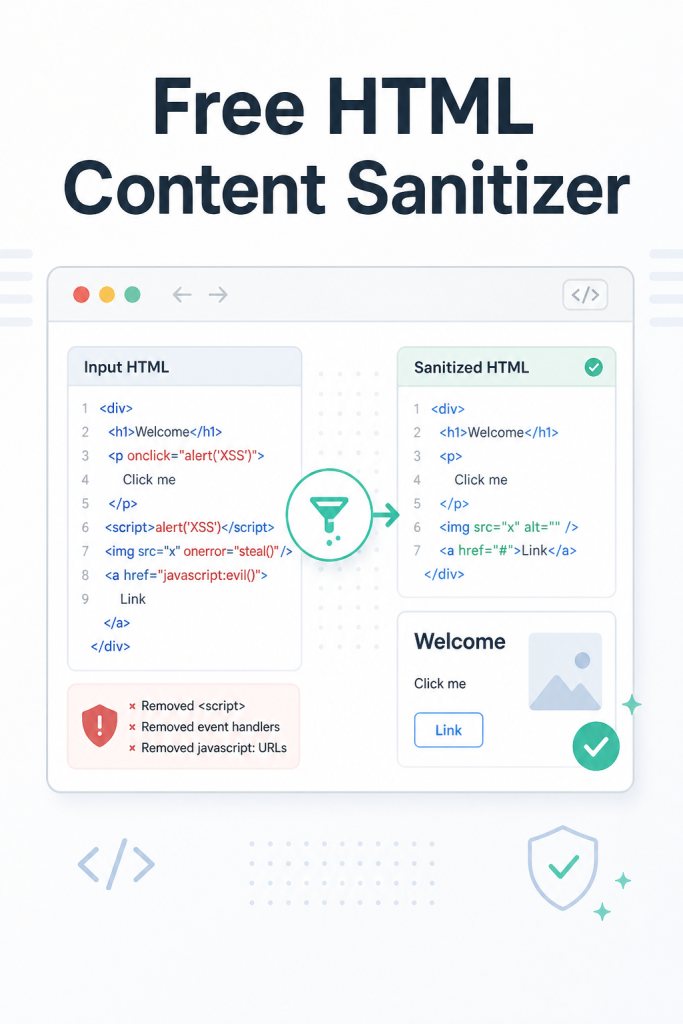
At this stage, using a browser-based cleanup utility can save time. The Free HTML Content Sanitizer, designed to clean pasted HTML before publishing, is designed for this exact step in the workflow. It helps prepare content for reuse in CMS editors, landing pages, and email tools without requiring software installation.
This kind of cleanup is especially helpful when you want to reduce unwanted formatting, remove messy markup, and make pasted content easier to manage in the next editor.
5. Paste the cleaned content into your CMS or builder
Once the content has been cleaned, move it into your blog editor, website builder, or landing page tool. Apply your site-native heading styles, paragraph formatting, and layout settings there instead of relying on formatting imported from the source.
6. Rebuild only the formatting you actually want
Use your editor to add intentionally:
- Correct heading levels
- Lists and spacing
- Links
- Emphasis such as bold or italics
- Buttons or callouts
This gives you more control and usually produces more consistent results across your site.
7. Preview before publishing
Always preview the post or page before going live. A preview helps you catch lingering spacing issues, broken list formatting, or sections that look fine in the editor but display differently on the frontend.
When to sanitize content before pasting into a CMS or landing page builder
Not every paste requires the same level of cleanup, but certain situations are strong signals to sanitize first rather than fix problems later.
It is smart to clean content in advance when:
- You are moving content from a word processor into WordPress or another CMS
- You are repurposing old blog posts into landing pages
- You are handing content between team members using different tools
- You are copying from emails, newsletters, or archived web pages
- You are pasting into a no-code builder that can react poorly to messy markup
- You need more predictable formatting across multiple posts or pages
In these cases, cleaning first is usually faster than troubleshooting after the content is already embedded in your layout.
How cleaner HTML can reduce layout surprises and manual editing time
Messy HTML creates friction because it adds invisible complexity. You may spend time deleting odd spaces, redoing lists, stripping out formatting, or rebuilding sections that should have worked on the first paste.
Cleaner content helps in a few practical ways:
- It reduces formatting carryover from the source
- It makes visual styling more consistent with your site design
- It lowers the chance of broken spacing and structure
- It can make future edits easier because the content is less cluttered
- It supports smoother handoffs between writing, editing, and publishing
For solo publishers and small teams, this matters because small delays add up. If every page needs extra cleanup, your publishing process becomes slower and more frustrating than it needs to be.
Final review checklist before hitting publish
Once your content is cleaned and pasted into the CMS, run through a quick final review.
Content and formatting checklist
- Headings follow a clear structure
- Paragraph spacing is consistent
- Bullets and numbered lists display correctly
- Links work and open as intended
- Bold and italic formatting is used intentionally
- No random font changes or color carryovers remain
- Shortcodes, embeds, or builder elements display properly
Layout and usability checklist
- The page looks right in preview
- Mobile layout appears clean
- There are no strange line breaks or oversized gaps
- Reusable blocks or templates still behave correctly
- The content is easy to edit if future changes are needed
This final pass does not need to take long. The goal is to catch the last few issues before your audience sees them.
Make HTML cleanup part of your normal publishing workflow
If you publish regularly, content cleanup should not be treated as an occasional rescue step. It works best as a standard part of the process, especially when content moves between multiple tools before it reaches your website.
A practical workflow might look like this: draft, edit, clean, paste, format, preview, publish. That sequence can help reduce stress and make your content production more predictable.
For bloggers, virtual assistants, solo site owners, and small marketing teams, a lightweight browser utility is often the simplest option. The Free HTML Content Sanitizer is a useful fit when you want a fast way to clean copied HTML before pasting it into a CMS, landing page editor, or email tool.
Before your next post or landing page goes live, add one extra step to your workflow: clean the pasted HTML first. If you want a simple browser-based option, try the Free HTML Content Sanitizer and make your next publish session smoother and easier to manage.



Discussion
Comments